Pages

Showing posts with label Canonical. Show all posts

Ayatana Scroll-bars Update (animated Scroll and new delays)

Ayatana is the project that was implemented by Canonical for collecting and implementing new design ideas which define the user interface of the Ubuntu Linux operating system. It was actually more relevant now more than ever since Ubuntu decided to switch to their own desktop interface called Unity with the introduction of the 11.04 Natty Narwhal.

Under Ayatana... currently they have a whole list of other child-project such as appindicator (the protocol that creates those menus once you move your mouse hoover to the notification area of the panel, etc), LibreOffice menu-bar (draws the standard menu in the Unity panel... which is troublesome with some of the recent version of the LibreOffice), Unity shell (the default Unity desktop plug-in that runs on Compiz), etc.

Anyhow, apart from many new inventions (some are heavily "inspired my Mac OSX ;-) ) the Ayatana Scroll-bars is actually one of the true Natty creations. If you use the Ubuntu 11.04 then you must know what they are. They were created for replacing the standard scroll-bars that always "appear" on the opened windows of your desktop applications.

Ayatana Scroll-bars are different in their own way by following the "philosophy" that says -
the success of a desktop UI is measured by how efficient it is or how good it is at not getting in the way of the users.
By default, these scroll-bars only appear when you move your mouse over to the edges of the windows and all the other time they're "hidden" thus preserving some "pixel space" which makes sense, right?. Currently the 3D/default Unity desktop is created using the GTK+ tool-kit but even most of the Ubuntu developers seem to believe that Unity will always be with GTK+ tool-kit but I think when considering some interesting quotes from Mark Shuttleworth himself such as ...
"...it’s the values which are important, and the toolkit is only a means to that end. We should evaluate apps on the basis of how well they meet the requirement, not prejudice them on the basis of technical choices made by the developer."
Slowly and slowly Canonical will be moving into a more Qt oriented OS rather that sticking with GTK module. Although one has to admit... GTK is a bit arrogant in its approach where Qt is more open-minded (not necessarily though).

Anyhow, day by day Ubuntu developers are working really hard for implementing new features and bug fixes for these Scroll-bars given the fact that they're so new (no more than few months old) thus there is plenty of room for improvements and via their design blog they keep the users updated and collect the feedback as well.

Few hours ago they posted an another update saying this time the Ayatana Scroll-bars are give few of the following features...

*. Support for right-to-left languages.

*. Various tweaks on delays before hiding the thumb.

*. Animated scrolling on page up/down and reconnection.

*. A visual connection between the thumb and the overlay.

*. A slightly modified shape for the thumb.


As said some users did request for a transparency portions of the scroll-bars but it seems that until the arrival of the GTK4+ tool-kit this implementation may not be possible. Anyway, if you have questions and new feature suggestions, then please visit this page and fire-up few comments ;-).

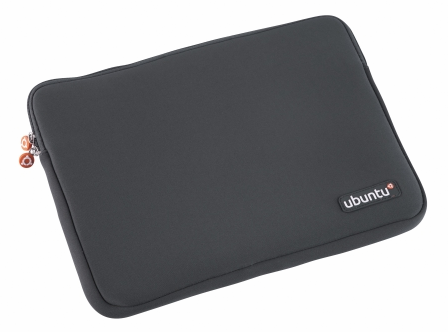
Canonical Store Launches a Neoprene Laptop Sleeve!

Canonical, unlike any other Linux distribution uses a lot of ways to promote their operating system, Ubuntu. At their store now we have Mugs, Ubuntu T-shirts, Ubuntu Mouse and USB pen drives, etc. Although I'm not sure when they launched this (it has to be done very recently since it says "New Item", still) but now they even have an official Laptop Sleeve available for purchasing!.

This is actually a pretty cool move since Laptops, Tablet PC's and Netbooks are replacing desktop PC's in a rapid speed more than ever. So, if you love the Ubuntu Linux operating system and already have a Laptop + wanna show-off your "love" for Ubuntu to your friends and stuff ;-), then why not give a shot at this all new Neoprene Laptop Sleeve.

It basically comes with three different sizes, "defined" by the screen size such as ...

*. 13/15 and 17 Inch versions (named - small/medium and large, respectably).


*. Comes with a color Grey on the outside and an Orange color inside of the sleeve.

*. The official Ubuntu Logo is displayed in two locations. Two rubber cycles with Ubuntu Logo (as in below screenshot) on the Zippers + the main Logo (also rubber) is displayed to the lower right corner of the Sleeve.


It looks pretty good and the inside looks "soft" and comfortable (well they all are anyway) thus I think not just a Laptop but you can easily use it as a "cover" for your Table PC without having to worry about any scratches on the touch-sensitive LCD screen, once inserted.

All the 3 different sizes come in the same price range which about £ 19.95 ($32 roughly) and you can purchase it from the Canonical online Store page

No More Synaptic (package manager) in Ubuntu Linux 11.10 Oneiric Ocelot!

The days are gone where people used to think that GNU/Linux has the "ability" to scare away the newbie :) yet when it comes to doing certain things, GNU/Linux can still be a bit hard to "tolerate". But the rest assured, thanks to the hard work of the developers and the users... nowadays, it is very user friendly.

But as said, there are certain aspects (installing/uninstalling applications) where you might get you into trouble. In the old days there weren't much GUIs for package management thus you had to do everything by using the command line. But the times has passed and different distributions have package mangers of their own (including a decent GUI, hopefully).

But because of the simplicity + the very little system resource needs of the command line tools... many users still prefer the command line while installing applications as well.

Anyhow, it took sometime for the Fedora team to come up with a decent GUI for the "Yum" package manager and even though they came up with a GUI around the version 4-5 yet it wasn't that impressive and at that time the package manager didn't even support installing packages from CD/DVDs!.

But, from the beginning, Debian team had the best/robust/stable package manager called "APT" (usually used with the command = apt-get). Later came its GUI called the Synaptic, GUI written in GTK+ which made managing packages in Debian based GNU/Linux distributions like Ubuntu for instance, much much easier.  

But, Synaptic is not perfect and at the moment do lack very few things, otherwise I think most will agree to the fact that it's perfect, almost :). For example, have a look at the below screenshot. Now as anyone can see, basically it has a search box and a left "panel" which displays the installed/available packages in categories.


So if you want to know about a certain package, then all you gotta do is just search for it. You don't even have to use a specific package name these days. Say that you wanted to install a "music player", then just use the term "music player" and do a search, Synaptic will give you applications that falls into that category!.

So, it's pretty much user friendly. But to be honest, it does lack a bit of a simplicity. Because having a lot of text around (anything) can be a bit confusing.

If we could do something like, replacing category names such as "Development", "Multimedia", "Games", "Utilities", etc with icons... then not only it'll add more simplicity but as soon as the eye hits the icon, it'll give the same expression as the texts would, in a much better way. Right?.

That's what the Ubuntu/Canonical developers have come up with. There is a separate package manager "suite" in Ubuntu Linux (I know you know this, but gotta write about :D) called "Ubuntu Software Center" which has exactly the above mentioned attributes. Basically it is almost everything that Synaptic is not.


It's not loaded with words/texts that much but use icons and as a result the interface is much more simpler.

They've also done excellent things such as, when you enter the main window, to the lower sections of the Software Center, now we have "featured applications" and whenever we click on an application, we can see a screenshot (which is available via Synaptic, but not displayed by default), shows the web site of the developer and most importantly, there are "actual" reviews/feedback by those who have used the app for real.

Further more, it has a "star points" which represents the quality level of the applications as well.

Although I don't own a touch-screen device such as a Tablet PC... but when looking at the two applications, the advantageous Ubuntu Software Center have over Synaptic is obvious, I think. And Canonical has been planning to replace Synaptic for a while now and the latest news is that, they'll do so by removing Synaptic from the upcoming Ubuntu 11.10 Oneiric Ocelot.

To be honest, I actually like the Ubuntu Software Center, although at times it feels like slightly "heavier" on my system resources... other than that, it is pretty easy to use and has an excellent user friendly GUI.

Although I used to think that it uses a lot of my memory (RAM) than Synaptic because every time I use it had a low response time. But then I did a bit of a memory check and actually realised that they both use similar amount of system resources!. Have a look at the below screenshots, which were taken separately, then the two package managers were opened (while running the home screen).

Synaptic uses 25.2MB....


USC uses about 27.3MB... marginal difference..., this is also true while installing applications too (at least while I tested them).

So what was it that gave me the impression that USC is slower/heavier (slow mouse pointer responsiveness, etc)?.

Well I guess it's just that, it uses a lot of your network (Internet connection) because unlike with Synaptic, USC has to download icons, screenshots, user reviews, its featured applications related data, etc from online sources thus it uses higher Internet connection bandwidth.

So, having a bit slower connection is actually the bottleneck here, at lest in my experience anyway +, when an application has to work with a lot of outside networks or web sites, it can use a bit of your CPU especially, which is usually "represented" by an unusually slower mouse pointer as well.

Synaptic on the other hand does not use a lot of your Internet bandwidth by "default" because there are no default screenshots (unless you manually enable it) or icons... it's basically a text-oriented GUI ... so the responsive times can be quite quicker since the Internet connection is not "busy" than while using USC.

Anyway, I'll always be using Synaptic in the future, because it is still a way powerful utility than USC since it has so many advanced/useful features that are not implemented in USC at the moment.

On the bright side, Canonical won't completely wipe out Synaptic from their distribution and it'll be available via their repositories. And if you don't like this "move", well, we have a lot other GNU/Linux distributions, just in case as well :).

What do you think??.

Kubuntu 11.04 is Released!

Simultaneous to the Ubuntu Natty Narwhal (11.04) release which brings the long waited... talked Unity desktop... the official KDE version of Ubuntu called Kubuntu has also released their 11.04 version as well. Unlike many other previous versions... this does bring some important new features according to their release log.

*. Comes with the KDE 4.6 version which brings the Kwin manager (default window handler for KDE).

According to the Kubuntu team, KWin now needs less resources but performs faster than previous versions!. Other benefits include better VGA driver integration, new power management GUI (very impressive and looks gorgeous!) + few improvements to the Dolphin as well (KDE's file manager).


*. File sharing made easy because of Samba!.

Sharing a file or a folder across a network has never been this easy according to Kubuntu team!. Just right click on the file/folder in Dolphin file manager and go to "Properties" and simply, share!.

Samba ... Samba ... Samba....

*. Better printer configuration.

Including few bug fixes... the new printer configuration now ingrates better with a lot of printers.

*. OwnCloud.


This is a cloud based storage that are hosted directly at KDE servers. Now as a Kubuntu user, you can easily access and manage your OwnCloud easily.

*. Switched to Phonon Gstreamer back-end.


It's a bit sad actually. KDE is certainly not second to no one and from certain aspects... it's way ahead of Gnome too. But for some reason (well, they say it's due to better compatibility with Ubuntu) they've decided to use the Gstreamer (the developers of Gstreamer won't say it's a Gnome project... but they seem to prefer Gnome :) ) as the multimedia framework.

Although the new Phonon... which is the KDE's own impressive multimedia framework, again due to compatibility, Kubuntu will be using Gstreamer via a Phonon back-end. Let's hope that next time they'll give us a full "KDE-lized" desktop.

Anyhow, these are few of the main features of Kubuntu 11.04 Natty Narwhal according to their official release announcement and all the details such as how to download it are also in that page. So follow the link and read it. And if you're upgrading from 10.10 version... then please read this official instruction page before proceeding. Good luck.

A Little Piece of Advice when Downloading Ubuntu 11.04 Natty Narwhal

OK, today I was busy (had to service my dad's car) and Canonical had no choice but to release Ubuntu without my presence :P. And when I finally came home... damn.. it was released. Anyhow, I "could be" writing a review of Ubuntu but if you haven't tried it when it was already in beta stage and want seriously to give a try now since it's officially released then first...

...you might want to read the excellent review written by Andrew from Webupd8 (including a video). Although as said before Andrew won't be giving all the details of every new feature since most have been using it for a while but ... it's well worth a read/"view" though.


Before downloading...

Ahh finally!...

I have nothing to hide, I'm a bit scarred by Canonical these days and usually I'd just go ahead and download it. But this time I'm gonna do it slowly.

Anyway, not just Ubuntu, usually any famous distribution, within the first days of their release sometimes (especially if you have a very fast internet connection) you may not be able to achieve the best possible downloading speeds due to the massive "traffic" these servers get.

And on the other hand, usually what happens next is that, while downloading if you got disconnected or something happened to your download, even though the software says the server supports "resume" capability.. yet most of the time (happened to be with Ubuntu, Fedora and Debian, recently that is) when you try to "resume" the server simply refuse to do that!.

So unless you have a very fast internet connection that usually takes about 4-5 minutes to download a 700MB CD image.. I highly advice you to try the official Ubuntu 11.04 torrent channel first. It may take a few seconds for the Bittorrent manager to get into the full throttle.. but the advantage here is that you'll always be able to "resume" your download no matter what! (more than handy if you have bit slower internet connection).

And you can use the Cloud computing feature that Canonical has been sneaking around :P in the recent times (very smart move though), which basically lets you to try Ubuntu 11.04 Natty Narwhal without having to download (click the link). This is only available for 55 minutes.

Although there is no official document telling what the hardware requirements other than Canonical saying...
"Ubuntu 11.04 is built to take advantage of the very latest technologies, but it should work on a most desktops, laptops and netbooks too..."
But I did write a post about the requirements of Ubuntu 11.04 Natty Narwhal from the bits and pieces that I "collected"(more than welcome to correct me if the hardware requirements of that post aren't that accurate).

Note: - But remember, unless you have a reasonably faster internet connection... don't judge the "speed" of Ubuntu based on this cloud test run. It's not fair for the hard work of the developers. And lastly, congratulations Canonical for this amazing achievement. Finally, something of your own, and thank you for making it free too :). 

Some Applications May not Work in Unity, Says Developers!

Now while running applications in Unity there are these "icons" that appear at the top right corner of the Unity Desktop called indicator icons. Here's the thing. Almost all the GTK+ based written applications rely primarily on Gnome to run properly. For instance, Gnome panel applets are heavily being used by some of the popular applications in GNU Linux in order for them to run properly.


Now since Canonical is obsessed with the "libappindicator" type application indicators which is the single most important idea that defines their new "Unity" desktop... they are trying to convert these Gnome panel applets to indicators.

But if they do so and completely remove the applets from Unity, then those programs that rely on Gnome applets won't simply run!. According to an Ubuntu developer, Martin, there has been a long discussion concerning the issue as well.

So they could make the decision to simply ignore the applets and convert them into "indicator icons" thus resulting few of the major applications not to run in Unity OR to create a white-list of apps and only to keep those applets needed by those applications in Unity. So when they release the long awaited Unity desktop within the next few days and some of the popular applications fail to work due to "missing Gnome applet" support, then I think you can guess what happened!.

Anyway, according to Martin, there are few proprietary applications that need these Gnome applets and it would be interesting what percentage of GNU licensed vs Proprietary will be white listed. And let's hope that Canonical would not disappoint their loyal users by simply not letting few popular apps not to work in Unity because of this "conversion" thing. 

Ubuntu Free CD Shipping (ShipIt) is Discontinued by Canonical

I first heard about Ubuntu, like... 5-6 years ago because of a friend who "had seen" a GNU Linux distribution that ships free CDs all around the world! called Ubuntu. This was the strength of not Ubuntu (at that time nor these days either) but of Canonical (owned by the millionaire Mark Shuttleworth).

At first, they were like crazy to ship CDs. One of my cousins had ordered like 12 or 14 pack of CDs (if I remember correctly) and for his "surprise", he actually received them!. Then after few years Canonical limited the shipping of CDs and brought few restrictions (makes sense), still they continued "shipping".

It's no more ... oh wait, wait!... it is still there... kinda :(

Sadly, yesterday they announced that the free CD shipping program known as the "ShipIt" is no longer active and there won't be any available starting with the Ubuntu 11.04.

What the..., so no CDs... really???

Well, there are these local Ubuntu communities (LoCos) that operates within countries and Canonical says they'll be "helping" them to distribute Ubuntu CD within there domains. And interestingly, they also say that

We will also continue to make the packs available through the store which are sold more or less at cost price (plus shipping)

So if you run a Ubuntu LoCo... then you can apply directly using a form and if chosen by Canonical, your "community" or LoCo will receive free CDs from Ubuntu!. So, no, the "project" isn't quite lost or dead... but somewhat limited.

Interestingly though, larger portion of the money which was used for the "ShipIt" program will be used to promote Ubuntu Cloud network. I have said this before and will say it again, still, average PC users do not benefit hugely from these type of technologies but as the time goes on, in the near future of course this would seriously fasten computer based processing... but I'm one of those guys who always feels a bit threatened by  the idea of "storing" your "data" in someone else "property" even after considering all those "benefits" that they claim you get.

Anyway, it is a good thing to see that free CDs from Ubuntu are still available (even with limited "versions"), but not quite sure the percentage of money Canonical receives from the average users, but using that money to fund something that is not directly beneficial for most of the "average users" seems a bit disrespectful. Oh well... guess this is all about just "doing business" for Canonical anyway.