Pages

Showing posts with label archive managers. Show all posts

Best Cross-Platform File & Archive Manager: PeaZip!

Both MS Windows and GNU/Linux desktops do come with file and archive managers of their own. Specially concerning Windows (since GNU/Linux has some excellent built in tools) if you're looking for a free & OpenSource yet one of the best file archive managers then PeaZip is an extremely impressive one!.

This is not just an archive manager actually but is also a file manager as well. But since Windows Explorer is pretty darn good, PeaZip won't be able to impress much here. But it lets you securely delete, encrypt or split your files as easy as just right clicking on them!.

Main features...

*. Can handle all the OpenSource fire archive formats such as:

7z[18],7z-SFX, FreeArc's ARC/WRC[19], bzip2: bz2, tar.bz2, tbz, tb2, gzip: gz, tar.gz, tgz, PAQ8F/JD/L/O,[20] LPAQ, ZPAQ, QUAD/BALZ, tar and WinRar and WinZip formats. Interestingly PeaZip has a file archive format of its own called "PEA" with all the modern features.

More than an archive manager...
*. Split and Join.

*. Add passwords.

*. Encrypt.


*. Hash check.

*. Create self extracting archives.

*. Has a portable version thus you can just put it into your USB drive or HDD and take it anywhere (it won't touch the Registry of the OS while running which is a standard feature for portable apps, I think).

*. Run MS Windows built in system tools directly from its file explorer, such as: Disk Defrag, Disk cleanup, System benchmark, task manager, etc.

*. Create "keyfiles" using random secure algorithms.


*. Open Command-prompt inside any folder (while using PeaZip as the file manager).

*. Integrate its feature into the "Sent To" sub-menu are just a few to mention.


As said before, as a file manager, it's not as impressive as the default one in the Windows but as an archive manager, it is super excellent! ;-). It has few built in themes (one in particular for the Win 7 users too).

So, if you're looking for an archive manager that can deals with almost all the popular archive (including e-mail handling) formats and few additional ones such as securely deleting files/folders and want all those features in a singe application which should also be free and opensource (oh cooome on! :P), then PeaZip is the one to go for without a doubt. Get it from this PeaZip Home page.

How to Install Xarchiver (archive manager) in Ubuntu Linux?

By default Ubuntu uses the File-Roller as the main archive manager (an original Gnome application). It's quite good actually but being a Gnome app, for the good or the worse it integrates the Gnome's simplicity (yikes) thus it won't let you change some options such as the default temporary folder location and creating a self extracting archive for instance.

Anyhow, if you're a bit frustrated with it and looking for something else that has the capacity to act as a powerful and fast loading archive management utility, then you should try the one called Xarchiver.

Xarchiver is basically a GUI front-end that uses a lot of built in command-line tools which are built into the GNU/Linux operating system to handle archives + is already the default archive management tool used by LXDE and Xfce desktops too.

It has a pretty simple (bit similar to the File-roller actually) interface and lets you do things like...


*. Add/Rename/Delete or Create an archive (containing emails, text files, etc) from scratch. 

*. Save an archive into a different format.

*. Add or remove passwords.


*. Test for extraction errors.

*. Supports a huge list of file formats such as - 7z, ARJ, bzip2, gzip, LHA, lzma, lzop, RAR, RPM, DEB, tar, and ZIP.

*. As said it also has the ability to let you create self extracting compressed files which is very handy since you can decompress those files without having to have installed an archive manager.

*. Add a comment (another features that File-roller doesn't have).

*. Show the command-line out put (handy while trying to figure out if you had an issue while extracting).


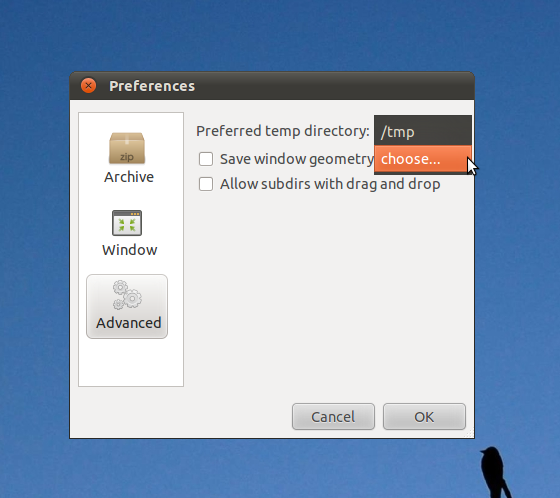
*. A separate "preferences" window (above screen-shot) that lets you configure things such as - ask for conformation while deleting files, change temporary folder location (very useful if you had a "data-full partition" thus the archive manager most probably be unable to extract the content otherwise), show/hide archive commenting, etc.

You can install the Xarchiver in Ubuntu 11.04 Natty Narwhal, 10.10 and 10.04 by entering the below command in your Terminal window.
sudo apt-get install xarchiver

That should do the trick. Enjoy your new and powerful Xarchiver for creating e-mail archives, out of multimedia files or password protected self extracting ones which makes exchanging archives much more easy and secure + for many more of your other nerdy needs :).